Free · yours to print and share
Your Remote Control
10 buttons: 6 press on you. 4 you press.
This is the remote control itself. Press any button below to see what it looks like when it lands. Save it or print it, and put it where the moment happens.
The fridge door. Your desk. Your phone’s lock screen. Free to save, print and share.
What every part of the system means, the Battery Charge included, is on the Quick Reference.
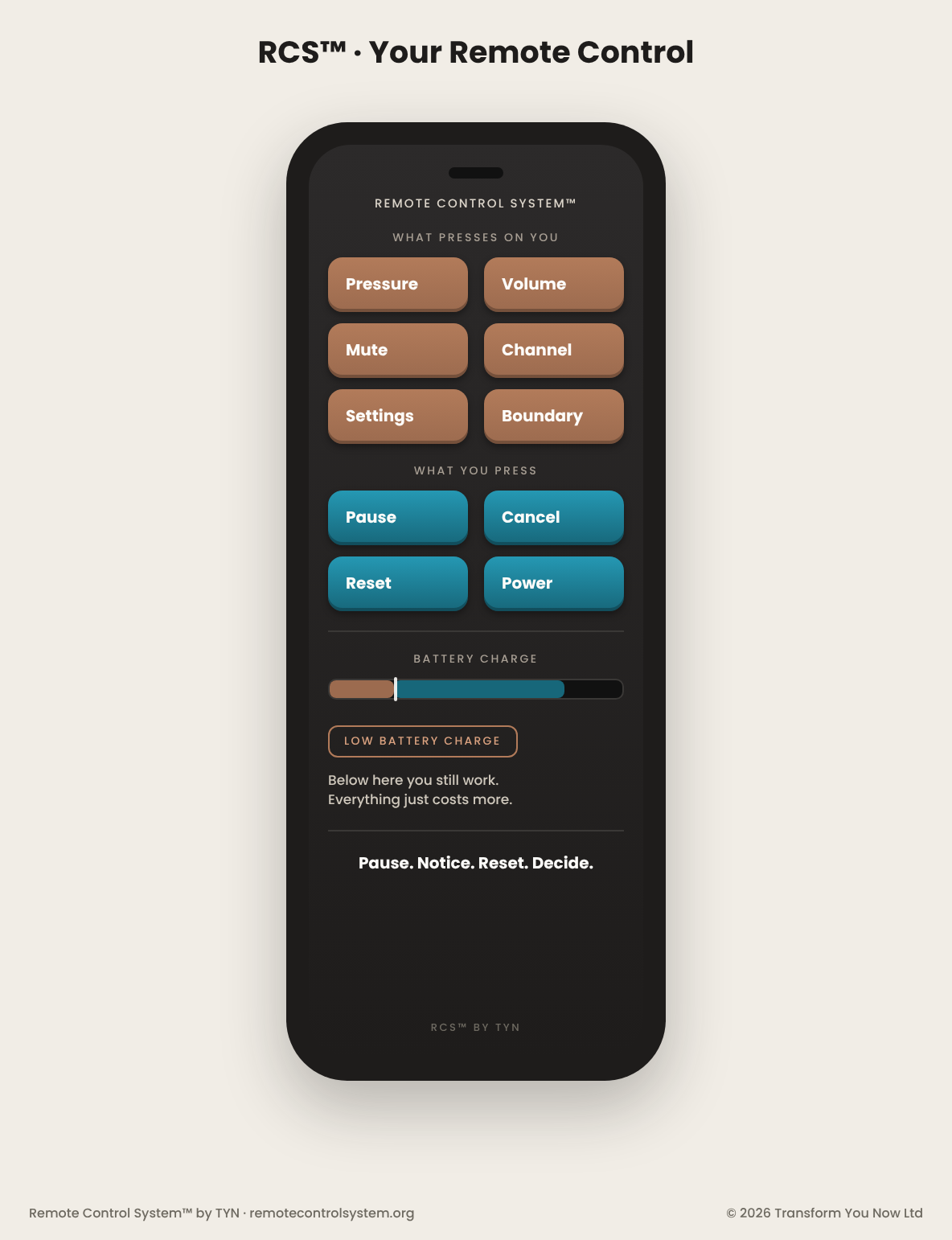
Your Remote Control Dashboard
Press any button. The 6 rust ones press on you and take the remote control out of your hand. The 4 turquoise ones you press, and they take it back.
What presses on you · 6 · rust
What you press · 4 · turquoise
Press a button
6 press on you and take the remote control out of your hand. 4 you press, and they return it. Press one to see what it does, what it sounds like and what to press next.
Pressure Button
Presses on you · takes the remote control out of your handWhat it isThe load itself, before it has a name.
It sounds likeThe load you picked up because no one else was going to, and never put down.
Then press Pause. 90 seconds before the answer leaves.
Open the 90-Second Pause & Decide tools →Its chapter is in the book →
Volume Button
Presses on you · takes the remote control out of your handWhat it isIntensity and pace taking the wheel.
It sounds likeThe reply that leaves faster and louder than you meant it to, and keeps going.
Then press Pause. 90 seconds before the answer leaves.
Open the 90-Second Pause & Decide tools →Its chapter is in the book →
Mute Button
Presses on you · takes the remote control out of your handWhat it isGoing quiet exactly when your voice is needed.
It sounds likeThe sentence you soften, then shorten, then drop and say perfectly when you’re alone.
Then press Pause. 90 seconds before the answer leaves.
Open the 90-Second Pause & Decide tools →Its chapter is in the book →
Channel Button
Presses on you · takes the remote control out of your handWhat it isThe truth changing direction.
It sounds likeThe subject that changes just before it gets close to the core.
Then press Pause. 90 seconds before the answer leaves.
Open the 90-Second Pause & Decide tools →Its chapter is in the book →
Settings Button
Presses on you · takes the remote control out of your handWhat it isAn old rule answering before you do.
It sounds likeThe old rule that answers in your voice.
Then press Pause. 90 seconds before the answer leaves.
Open the 90-Second Pause & Decide tools →Its chapter is in the book →
Boundary Button
Presses on you · takes the remote control out of your handWhat it isA line being crossed or tested; something arriving that is not yours to carry.
It sounds likeThe job that was theirs, and somehow became yours.
Then press Pause. 90 seconds before the answer leaves.
Open the 90-Second Pause & Decide tools →Its chapter is in the book →
Pause Button
You press · takes the remote control back into your handWhat it isThe 90 seconds you take before the answer leaves. The one you can use right now, free.
It sounds like“Hold on. Give me 90 seconds.”
Press it now. The 90-Second Pause is the breath. The 90-Second Decide is the 1 framework sequence: Pause, Notice, Reset, Decide. Together, that’s the Remote Control System™ in action. Free. No email. No account.
Open the 90-Second Pause & Decide tools →Its chapter is in the book →
Cancel Button
You press · takes the remote control back into your handWhat it isStops the automatic answer before it leaves.
It sounds like“Not that answer. Not from me.”
When to press it is in the book. Naming is free. Learning is the book. It teaches the RCS™ framework sequence and the 10 buttons. Practising is the workbook. Catching the Moment is the app. That’s the Remote Control System™ in action.
Its chapter is in the book →Get the Book & Workbook Bundle · £37 →
Reset Button
You press · takes the remote control back into your handWhat it isComes back to the here and now, the present moment.
It sounds like“Back to this moment, not the last three.”
When to press it is in the book. Naming is free. Learning is the book. It teaches the RCS™ framework sequence and the 10 buttons. Practising is the workbook. Catching the Moment is the app. That’s the Remote Control System™ in action.
Its chapter is in the book →Get the Book & Workbook Bundle · £37 →
Power Button
You press · takes the remote control back into your handWhat it isChooses the response, intentionally, on purpose.
It sounds like“This is my reply, and I chose it.”
When to press it is in the book. Naming is free. Learning is the book. It teaches the RCS™ framework sequence and the 10 buttons. Practising is the workbook. Catching the Moment is the app. That’s the Remote Control System™ in action.
Its chapter is in the book →Get the Book & Workbook Bundle · £37 →
RCS™ framework sequence
Pause · Notice · Reset · Decide
The bar under the buttons is the Battery Charge. What it means, and Low Battery Charge, is on the Quick Reference.
The Remote Control System™ is for the everyday pressure moment, not a crisis. If you need urgent support, click here.